 Launch price
Excel · Google Sheets · Printable
Household Binder Printables & Spreadsheet
Emergency contacts, key documents and account list in one binder. Spreadsheet in 5 colors + printable pages.
$9.90Regular price $16.90See details →

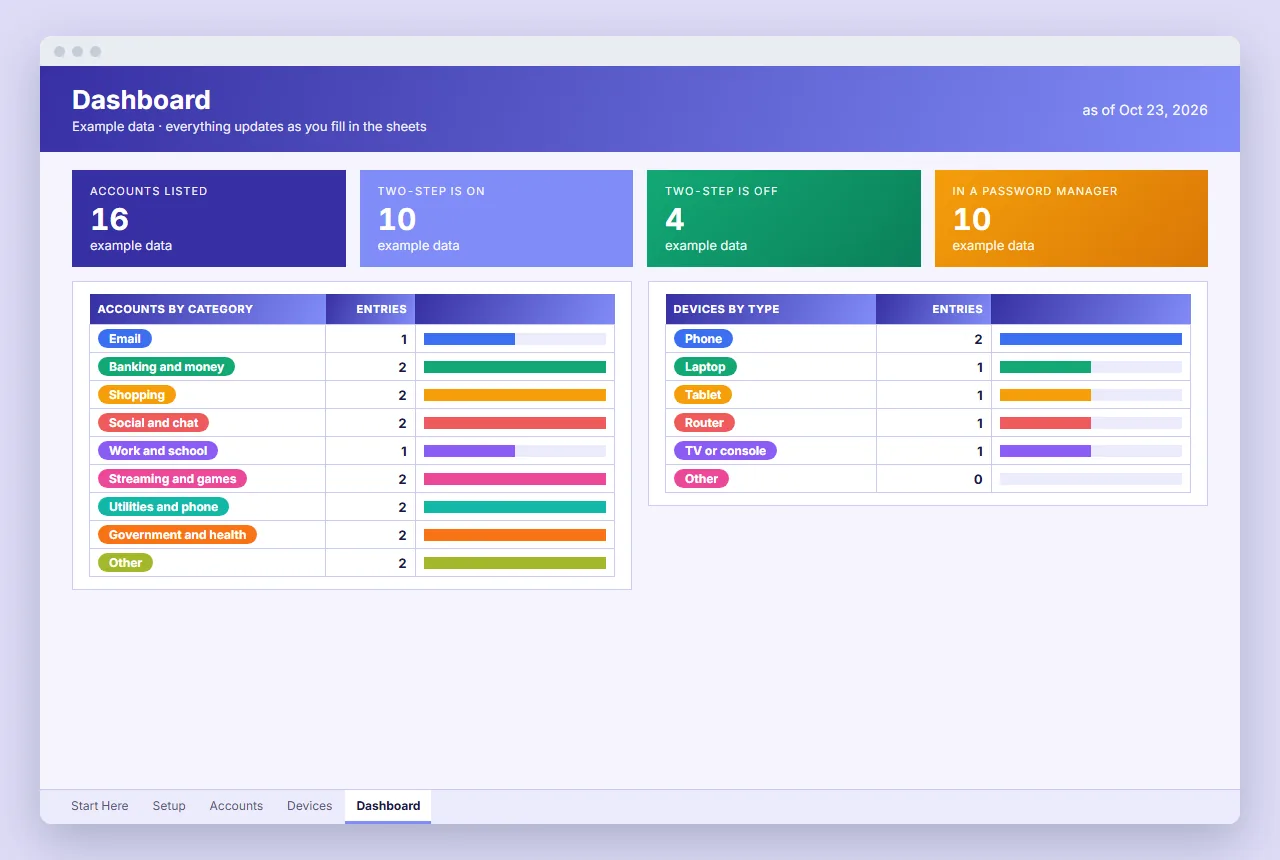
A password log template that keeps you safe instead of storing your secrets. List every account, note where its password lives and whether two-step sign-in is on, and a dashboard shows what to fix first.
Your download appears on the next page. Bookmark it to come back anytime.
Download the Excel file, make your own copy in Google Sheets, or print the PDF.
Fill in your own numbers. Everything works on a phone, a laptop or on paper.
For personal use only. Please don’t resell, share or redistribute these files. Every file carries mivru.com in its footer.
Pick the year and edit categories and device types.
Where the password is kept, two-step sign-in, last change.
Phones, laptops, tablets and routers: lock and backup check.
Counts accounts without two-step sign-in or old passwords.
A map of your accounts, not a place for passwords.
CISA: a strong, different password for every account.
Turn it on, especially for email, social and finance.
Never write one on paper that others could find.
Ocean, Sunset, Berry, Mint and dark Midnight.
Works in both. Google Sheets needs a free account.
Type in the yellow cells. Every formula is built in.
Color and black-and-white. Account log, recovery page and hacked-account checklist.
The spreadsheet has 5 sheets. Start Here explains the steps. On Setup you pick the year and edit the lists of categories and device types. The Accounts log has one row per account: the name, a category, the username or email, where the password is kept (password manager, browser, memorized or paper in a safe), whether two-step sign-in is on, and the date the password was last changed. The Devices sheet lists phones, laptops, tablets and routers with a screen lock and backup check.
The Dashboard does the checking for you. Tiles show how many accounts you list, how many have two-step sign-in, how many do not, how many passwords live in a password manager and how many have not changed in 12 months. Two tables show accounts by category and by where the password is kept, so you can see at a glance which accounts need attention first.
A spreadsheet or a sheet of paper is not a safe place for passwords. The US Cybersecurity and Infrastructure Security Agency says to use a different strong password for every account and a password manager to remember them, and to turn on multifactor authentication, especially for email, social media and financial accounts. This organizer fits that advice: it is a map of your accounts, not a vault. It tells you which accounts still need a password manager entry or two-step sign-in. Never write the master password for a bank, email or password manager on paper that anyone could find.
The download has the same organizer in five color themes: Ocean, Sunset, Berry, Mint and a dark Midnight version. It works in Microsoft Excel and in Google Sheets with a free Google account. If you like paper, the 10-page printable comes in color and in black and white, with an account log, a recovery and contacts page, a device list, a security checkup and a "what to do if an account is hacked" checklist. Example accounts are made up so you can see how it works; clear them and add your own.
Want a taste first? Try the free printable password log.
Launch priceEmergency contacts, key documents and account list in one binder. Spreadsheet in 5 colors + printable pages.
 Launch price
5 tabs in 5 colors + 12-page printable planner. Excel & Google Sheets.
 Launch price
17 tabs + 20-page printable planner. Excel & Google Sheets.
No. The organizer records where each password is kept, such as a password manager, and whether two-step sign-in is on. Use a password manager for the passwords themselves.
Yes. Upload the .xlsx file to Google Drive and open it with Google Sheets, or open it in Microsoft Excel. The drop-downs and formulas work in both.
It asks for a second proof of who you are, such as a code sent to your phone, in addition to your password. It makes it much harder for someone else to get into your account.
On the Accounts and Devices sheets, select the yellow cells under the headings and press Delete. The made-up examples are the only thing to remove.
An instant download: the spreadsheet in 5 color themes and the 10-page printable in color and black and white, plus access any time from My downloads with the email you used at checkout.