 Launch price
Excel · Google Sheets · Printable
Bill Tracker Spreadsheet & Printable
17 tabs + 20-page printable planner. Excel & Google Sheets.
$9.90Regular price $16.90See details →

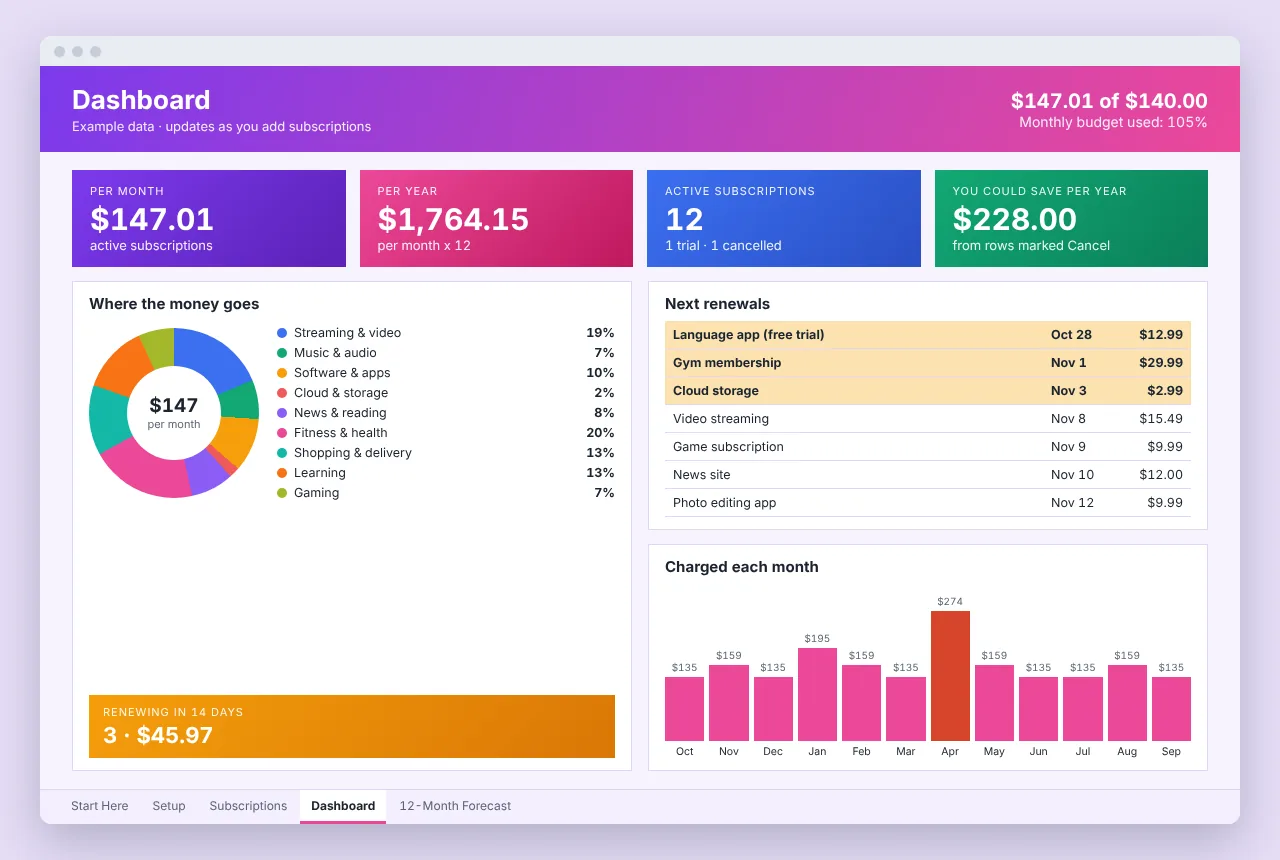
A subscription tracker spreadsheet that lists every recurring charge, works out the next renewal date for you and shows what it all costs per month and per year. Mark what to cancel and see what you would save.
Your download appears on the next page. Bookmark it to come back anytime.
Download the Excel file, make your own copy in Google Sheets, or print the PDF.
Fill in your own numbers. Everything works on a phone, a laptop or on paper.
For personal use only. Please don’t resell, share or redistribute these files. Every file carries mivru.com in its footer.
Monthly budget, warning days, categories and payment methods.
One row each: cost, billing cycle, start date and status.
Worked out for you, with days left and cost per month.
Mark Keep, Review or Cancel and see the yearly saving.
Cards for monthly cost, yearly cost, active and savings.
How much of your monthly budget you use.
What gets charged in each of the next 12 months.
Shows the date a trial turns into a charge.
Ocean, Sunset, Berry, Mint and dark Midnight.
Works in both. Google Sheets needs a free account.
Type in the yellow cells. Every formula is built in.
Color and black-and-white. Subscription list, renewal calendar and cancel log.
Charges you forgot about are easy to miss, and free trials often turn into paid plans. The U.S. Federal Trade Commission advises you to mark the cancellation deadline of a free trial on your calendar, keep a copy of your cancellation request and dispute unexpected charges with your card company. The tracker and the cancel log are built for exactly that.
The spreadsheet has 5 tabs. Start Here explains how it works in five steps. On Setup you type your monthly subscription budget, how many days before a renewal you want a warning, and your categories and payment methods. Then you add one row per subscription on the Subscriptions sheet: the name, category, cost, billing cycle (weekly, monthly, quarterly or yearly), the date you started or were last charged, how you pay and its status (Active, Trial, Paused or Cancelled).
The tracker works out the rest. It calculates the next renewal date for you, so the list never goes out of date, then shows days left, the cost per month and per year, and flags renewals that are due soon. A Decision column (Keep, Review, Cancel) lets you mark what to drop, and the dashboard adds up what that would save you in a year.
The Dashboard shows four color cards (cost per month, cost per year, active subscriptions and possible yearly savings), how much of your monthly budget you use, a donut chart of where the money goes, your next renewals and your biggest costs. The 12-Month Forecast lists what gets charged in each of the next 12 months, so yearly and quarterly renewals light up months before they land. Free trials show the date they turn into a charge.
The download has the same spreadsheet in five color themes: Ocean, Sunset, Berry, Mint and a dark Midnight version. It works in Microsoft Excel and in Google Sheets with a free Google account. You only type in the yellow cells; every formula is already built in. If you like paper, the 12-page printable planner comes in color and in black and white, with a subscription list, a cost worksheet, a renewal calendar, a free trial tracker, an audit page, a cancel log, a yearly renewals page and a savings page.
Charges you forgot about are easy to miss, and free trials often turn into paid plans. The U.S. Federal Trade Commission advises you to mark the cancellation deadline of a free trial on your calendar, keep a copy of your cancellation request and dispute unexpected charges with your card company. The tracker and the cancel log are built for exactly that.
It suits anyone who suspects they pay for more subscriptions than they use, couples who share services, and anyone building a budget who wants every recurring charge in one place. The 14 example subscriptions are made-up examples with generic names so you can see how it works; clear them and start with your own.
Not ready to buy? Start with the free printable Subscription Audit Sheet.
Launch price17 tabs + 20-page printable planner. Excel & Google Sheets.
 Launch price
17 tabs in 5 colors + 20-page printable planner. Excel & Google Sheets.
 Launch price
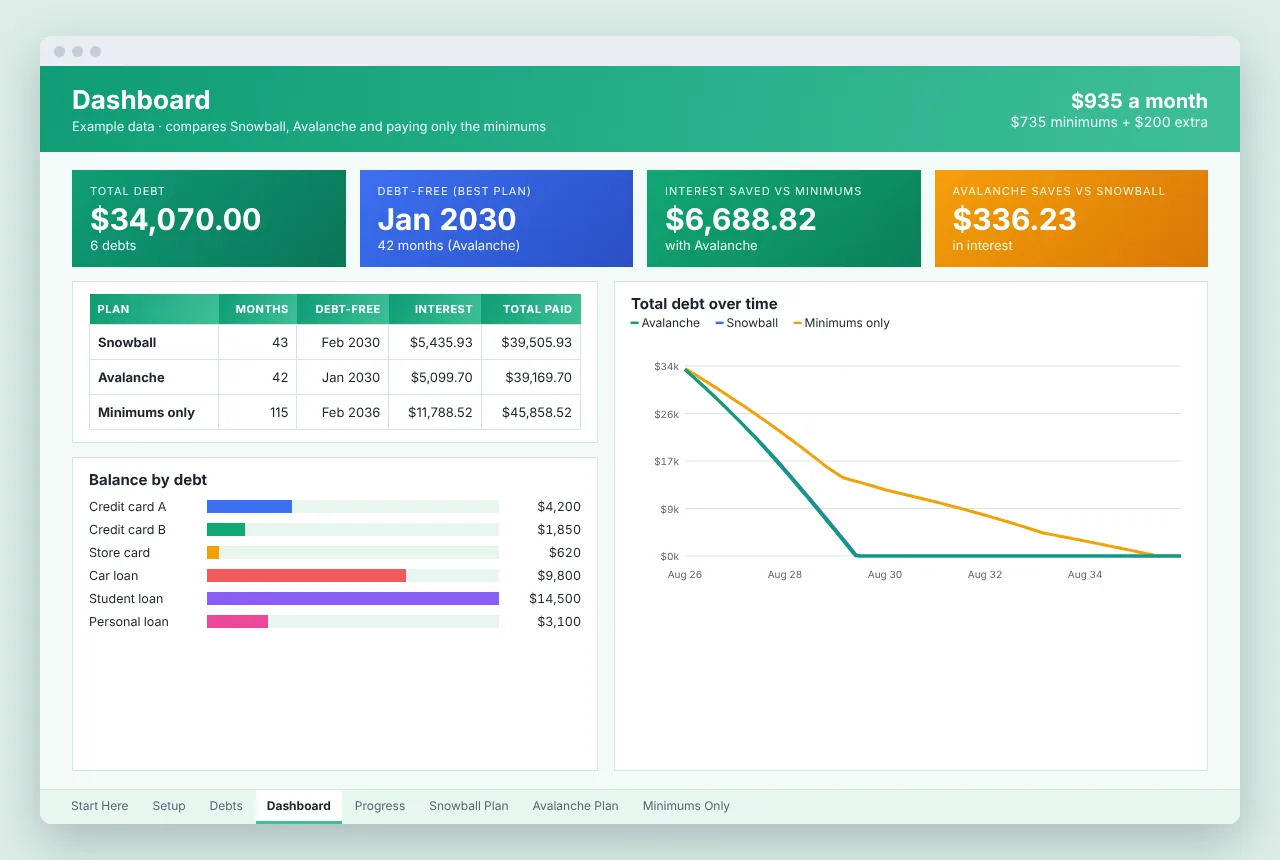
8 sheets in 5 colors: snowball + avalanche plans + 12-page printable. Excel & Google Sheets.
Yes. Upload the .xlsx file to Google Drive and open it with Google Sheets, or open it in Microsoft Excel on a computer. The formulas and drop-downs work in both.
You type the date you started or were last charged and pick the billing cycle. The tracker counts forward from that date and shows the next renewal, so you never have to update the date by hand.
Yes. Pick Weekly, Monthly, Quarterly or Yearly for each one. Yearly costs are shown per month too. For a free trial, set the status to Trial and type the first charge date; it flags the trial before it ends.
On the Subscriptions sheet, select the yellow cells under the headings and press Delete. The example rows are the only thing you need to remove.
An instant download: the spreadsheet in 5 color themes and the 12-page printable planner in color and black and white, plus access any time from My downloads with the email you used at checkout.