Password Log Example: A Safe Way to Fill One In
A password log example with 16 made-up accounts, two-step status and 6 devices: what to record, what to leave out and what the counts tell you.
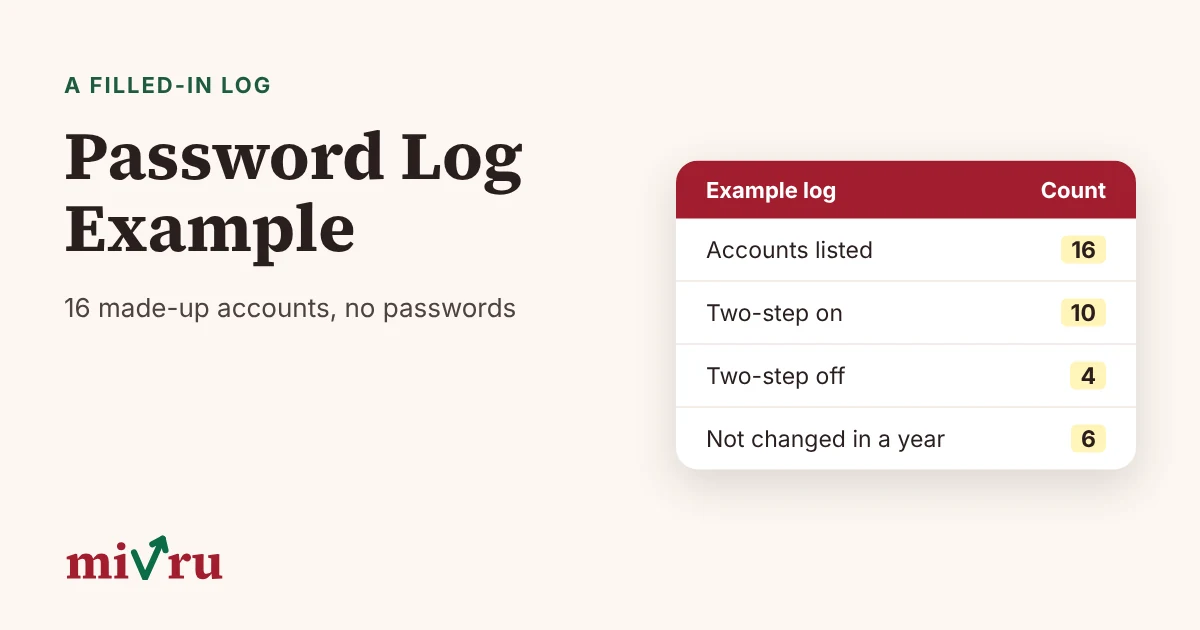
This password log example shows 16 made-up accounts and 6 devices, with what each column holds and what the counts tell you. There are no passwords in it, on purpose. Every name, username and date is invented.
The accounts
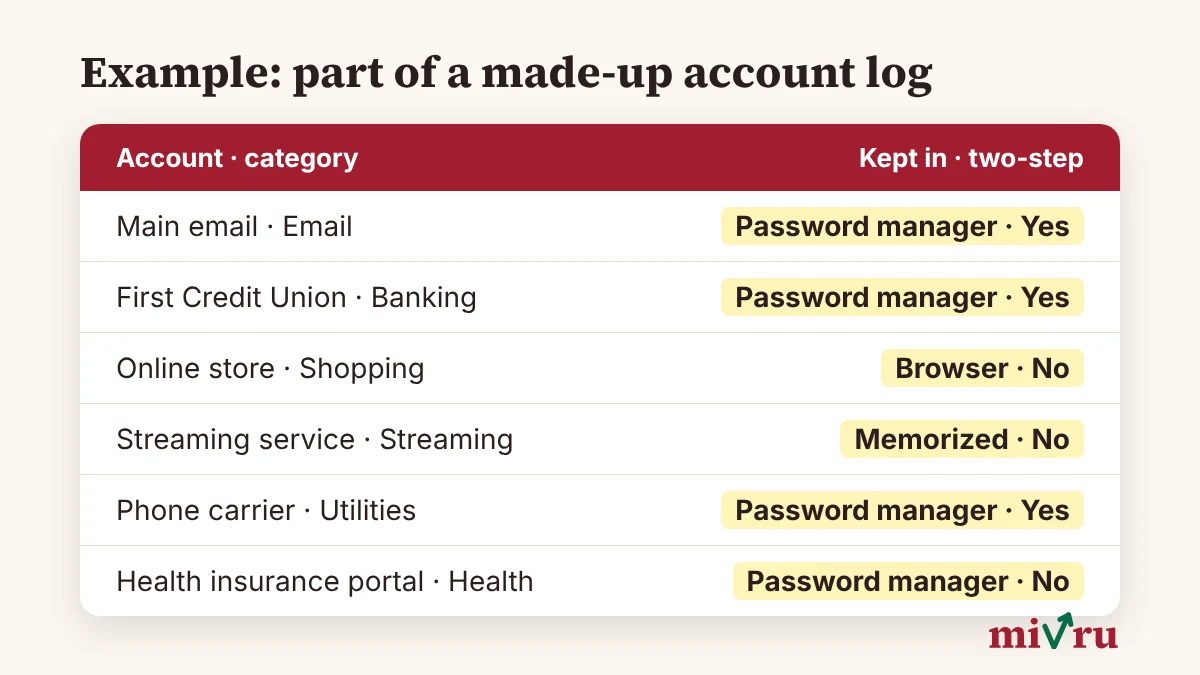
The made-up person lists 16 accounts in nine categories: email, banking and money, shopping, social and chat, work and school, streaming and games, utilities and phone, government and health, and other. Each row has a username or email, where the password is kept, whether two-step sign-in is on and the date of the last change.
Where the passwords live
| Where kept | Accounts |
|---|---|
| Password manager | 10 |
| Browser | 4 |
| Memorized | 2 |
| Paper in a safe | 0 |
The two memorized entries are the streaming service and the password manager itself. The master password is a long passphrase that lives only in the person's head, as the US Cybersecurity and Infrastructure Security Agency suggests when it says to use a password manager and one long master passphrase.
Two-step sign-in
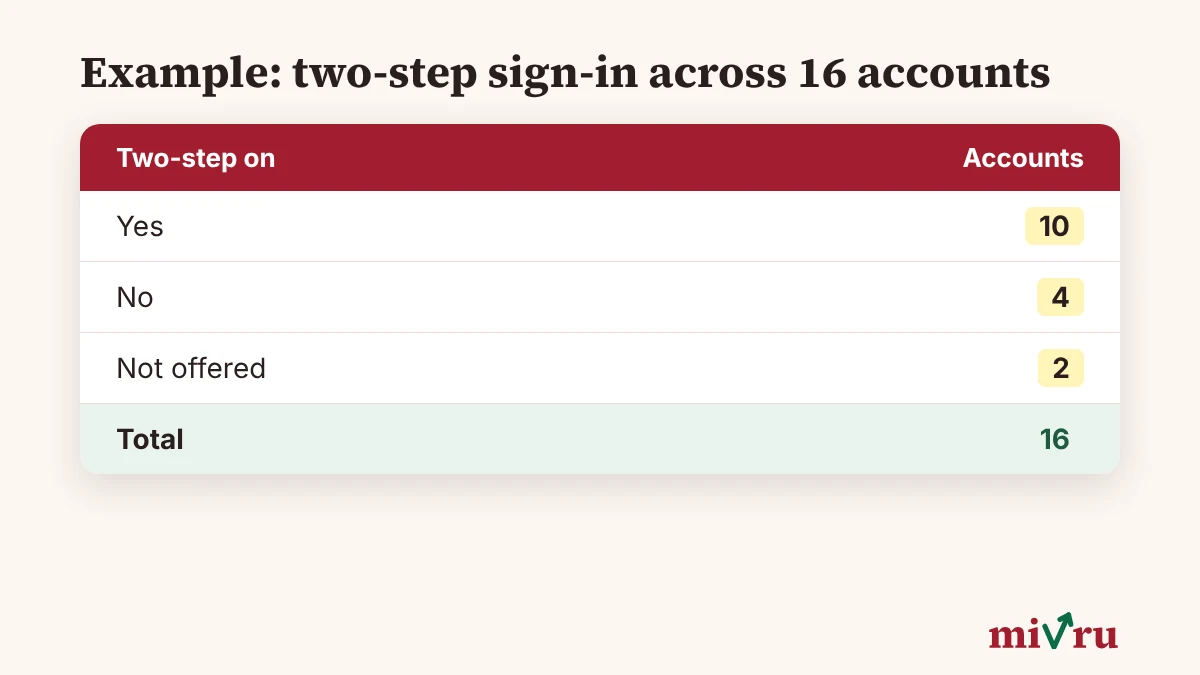
Ten accounts have two-step sign-in on, four have it off and two do not offer it. The four without it are the online store, the streaming service, the game account and the health insurance portal.
Example: The to-do list writes itself: turn on two-step sign-in for the online store and the health portal first, because they hold payment details and personal information. The FTC explains how in its guide to two-factor authentication.
Passwords not changed in a year
On October 23, 2026, six accounts were last changed more than 365 days earlier: the online store (November 2024), the marketplace (February 2025), the chat app (September 2025), the streaming service (December 2023), the game account (April 2024) and the health portal (June 2025). Four of those six store their password in a browser or in memory, not in a password manager.
The point is not that every password must change on a schedule. It is that old, reused or weak passwords are the ones to look at first. The FTC says to use a different password for every account and CISA says to aim for 16 or more characters.
Accounts by category
Email 1, banking and money 2, shopping 2, social and chat 2, work and school 1, streaming and games 2, utilities and phone 2, government and health 2, other 2. Total: 16.
The devices
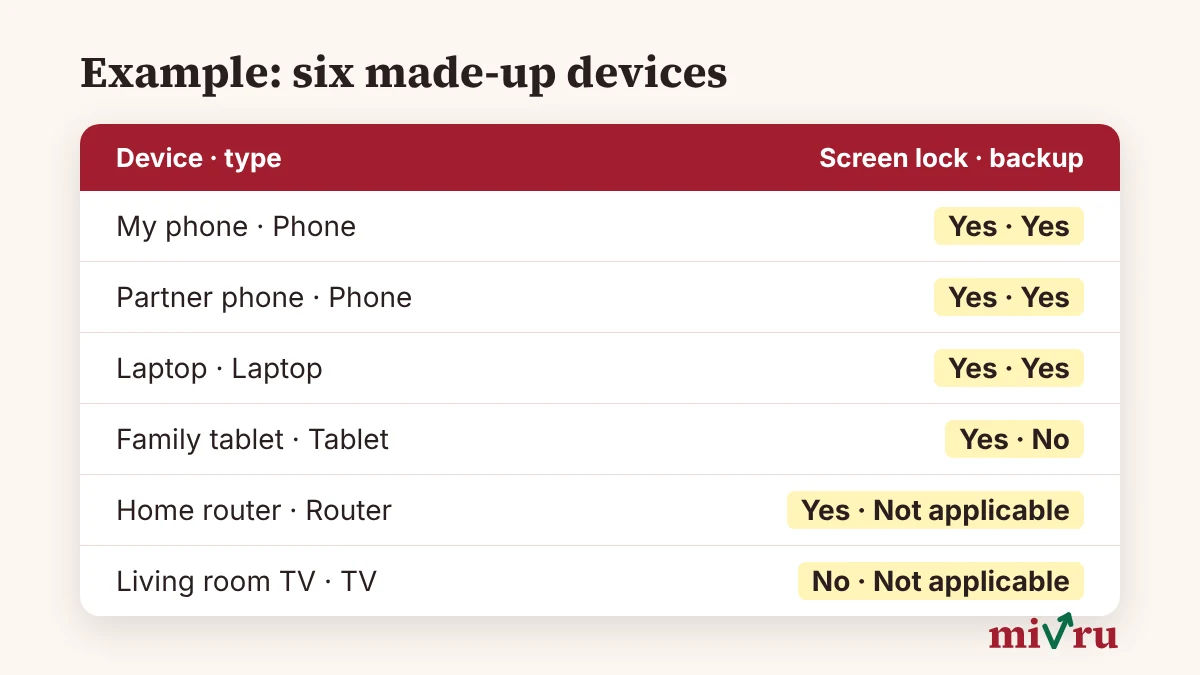
The device list has 6 rows: two phones, a laptop, a family tablet, the home router and a TV. Five have a screen lock on (the TV does not), and three have a working backup (the two phones and the laptop). The tablet needs a backup, and the router and TV are marked not applicable.
What the example teaches
- A log is a to-do list. It shows what to fix first, without holding a single password.
- Email and money come first. Both already have two-step sign-in on in the example.
- Old shopping and streaming accounts are the weak spot. They are easy to forget.
- Devices count too. A phone with no lock is an open door to accounts that are logged in.
- Leaving passwords out is the safety feature. If someone finds this page, they learn nothing they can log in with.
Build your own
Read why not to store passwords in a book in our password log book template guide. Then build the sheet in Excel or Google Sheets. For the rest of your household papers, see the household binder example, and for recurring charges the guide on how to track subscriptions. This is general information, not personal security advice.
The counts in one table
| Check | Count (of 16 accounts) |
|---|---|
| Two-step sign-in on | 10 |
| Two-step sign-in off | 4 |
| Two-step not offered | 2 |
| Password kept in a password manager | 10 |
| Password kept in a browser | 4 |
| Password kept in memory | 2 |
| Password not changed in over a year | 6 |
The counts tell you what to do first. An account with two-step off and a password more than a year old goes to the top.
How to turn the counts into a plan
- Start with accounts that hold money or personal data. Online stores, banks and health portals matter most.
- Turn on two-step where it is offered. The four accounts with it off are the first jobs.
- Move passwords out of memory into a manager, starting with the most important account.
- Change the oldest passwords. Choose a long, unique password for each one.
- Check the list again in three months. The counts should move in the right direction.
What the log must never contain
The example has no passwords, no security answers and no recovery codes. Those secrets belong in a password manager or another secure place. The log only says where they are, which is enough to guide you and safe if someone sees it.
Want the example ready-made?
The Mivru Password Log & Account Organizer includes this example, so you can click around before you clear it and enter your own accounts. It has Accounts and Devices sheets, a Dashboard that counts what to fix first and an 10-page printable, in five color themes for Excel and Google Sheets. See the Password Log & Account Organizer.
Frequently asked questions
What does a password log example look like?
It lists each account with a category, a username, where the password is kept, whether two-step sign-in is on and the date it was last changed. It does not contain passwords.
Are the accounts in this example real?
No. Every account, username and date is made up. Use your own details.
What does Not changed in 12 months mean?
It counts accounts whose last changed date is more than a year ago. It is a prompt to review those accounts, not a rule that every password must change every year.
Why list devices in a password log?
Devices hold your accounts. A screen lock and a working backup protect them if a phone is lost or a laptop fails.
Can I copy this example?
Yes. The Mivru account organizer includes this example data, so you can click around, then clear it and add your own accounts.