 Launch price
Excel · Google Sheets · Printable
Bill Tracker Spreadsheet & Printable
17 tabs + 20-page printable planner. Excel & Google Sheets.
$9.90Regular price $16.90See details →

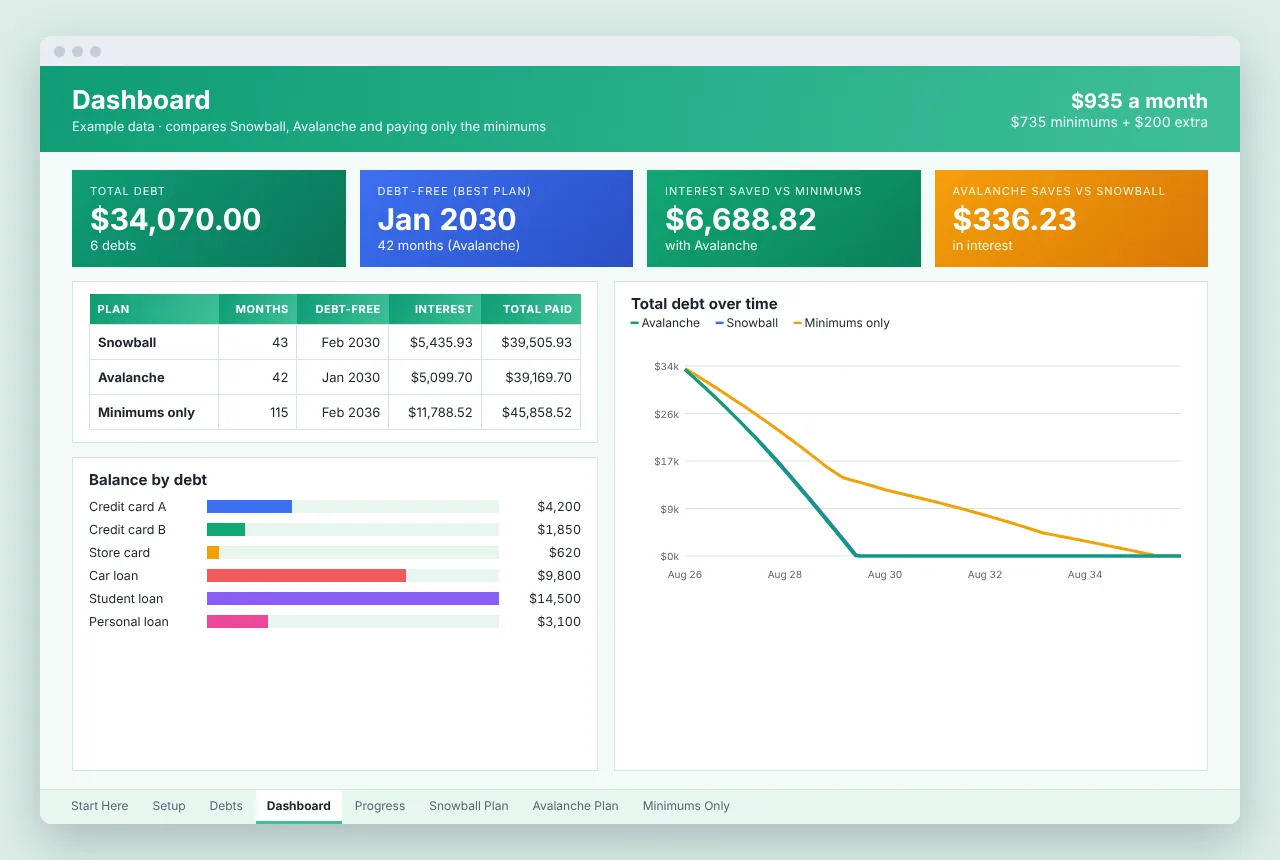
A debt payoff tracker spreadsheet that runs a snowball plan and an avalanche plan for you, month by month. See your debt-free date, the interest you will pay and how much you save compared with paying only the minimums.
Your download appears on the next page. Bookmark it to come back anytime.
Download the Excel file, make your own copy in Google Sheets, or print the PDF.
Fill in your own numbers. Everything works on a phone, a laptop or on paper.
For personal use only. Please don’t resell, share or redistribute these files. Every file carries mivru.com in its footer.
First payment date and the extra you can pay each month.
List up to 10 debts: balance, APR and minimum payment.
Snowball and Avalanche, month by month for up to 240 months.
A third sheet shows what happens if you pay only minimums.
Debt-free month, total interest and total paid, side by side.
See what the best plan saves versus the minimums.
Total debt over time and a bar for each debt.
Type each month's balances to see if you are ahead.
Ocean, Sunset, Berry, Mint and dark Midnight.
Works in both. Google Sheets needs a free account.
Type in the yellow cells. Every formula is built in.
Color and black-and-white. Debt list, plan chooser and progress bars.
Interest is calculated each month as balance x APR / 12. Real lenders may use daily balances or billing dates, so treat the dates as a close estimate. This is a planning tool, not financial advice. If your debts feel unmanageable, the U.S. Federal Trade Commission has a guide, Choosing a Credit Counselor, on what to ask before you work with a credit counseling organization.
The spreadsheet has 8 sheets. Start Here explains how it works in five steps. On Setup you type the date of your first payment and how much extra you can pay each month on top of your minimums. On Debts you list up to 10 debts: the name, type, balance, interest rate (APR) and minimum payment. The sheet works out the monthly interest on each one and checks that your minimum payment at least covers it.
Then the workbook runs the numbers for you. Two plans are calculated month by month for up to 240 months: Snowball (smallest balance first) and Avalanche (highest interest rate first). Every debt gets its minimum, the extra money goes to the first debt in the order, and when that debt is paid off its payment rolls to the next one. A third sheet shows what happens if you only pay the minimums.
The Dashboard compares the three plans side by side: the debt-free month, the total interest and the total paid. You also see how much interest the best plan saves compared with the minimums, and how much Avalanche saves compared with Snowball, plus a chart of your total debt over time and a bar for each debt. On Progress you type each debt's balance at the end of every month, and the sheet shows whether you are ahead of the plan you follow and how much of your starting debt is paid off.
The download has the same spreadsheet in five color themes: Ocean, Sunset, Berry, Mint and a dark Midnight version. It works in Microsoft Excel and in Google Sheets with a free Google account. You only type in the yellow cells; every formula is already built in. If you like paper, the 12-page printable planner comes in color and in black and white, with a debt list, a plan chooser, a payoff plan, a payment tracker, two years of balance trackers, progress bars, an interest worksheet and an extra money finder.
Interest is calculated each month as balance x APR / 12. Real lenders may use daily balances or billing dates, so treat the dates as a close estimate. This is a planning tool, not financial advice. If your debts feel unmanageable, the U.S. Federal Trade Commission has a guide, Choosing a Credit Counselor, on what to ask before you work with a credit counseling organization.
It suits anyone with credit cards, store cards, car loans, student loans, personal loans or medical bills who wants one clear plan and a date to aim for. The 6 example debts are made up so you can see how it works; clear them and enter your own.
Not ready to buy? Start with the free printable Debt Snowball Starter Sheet.
Launch price17 tabs + 20-page printable planner. Excel & Google Sheets.
 Launch price
17 tabs in 5 colors + 20-page printable planner. Excel & Google Sheets.
 Launch price
5 tabs in 5 colors + 12-page printable planner. Excel & Google Sheets.
Yes. Upload the .xlsx file to Google Drive and open it with Google Sheets, or open it in Microsoft Excel on a computer. The formulas and drop-downs work in both.
Snowball puts the extra money on the smallest balance first, so debts disappear quickly. Avalanche puts it on the highest interest rate first, which usually costs less interest. The workbook calculates both so you can compare the debt-free date and the total interest.
Up to 10. Each plan is calculated month by month for up to 240 months (20 years).
On the Debts sheet, select the yellow cells under the headings and press Delete. On the Progress sheet, clear the yellow balances. The example debts are the only thing you need to remove.
No. It is a planning tool that does the maths for the debts and payments you enter. Interest is estimated as balance x APR / 12 each month, so real dates may differ a little.
An instant download: the spreadsheet in 5 color themes and the 12-page printable planner in color and black and white, plus access any time from My downloads with the email you used at checkout.